
How CheckMeOut actually works
No app tour, no jargon — six steps, each with a real example underneath it, so you can see exactly what you'd be signing up for before you sign up for it.
Spot it
See something you like — on a friend, in a shop window, scrolling online. Nothing to do yet, just notice it.
Your friend Jess is wearing a rust-coloured corduroy jacket you can't stop thinking about.
Snap it
Take a photo of the item itself — not the person wearing it — and upload it. That's the whole ask.
You ask Jess for a quick photo of the jacket (or snap one of it on a hanger). Tap “New post,” upload it, done.
Wear it
Add a few photos of yourself to your profile, just once — standing front, standing back, and seated cover the most outfits. After that, tap “Try it on” under anything you post and CheckMeOut's AI shows you wearing it, reusing that same set every time.
You tap “Try it on” under the jacket post. A few seconds later, there's a photo of you in the jacket. Later, that same front/back/seated set gets reused to try on a suit, a blazer, and a tracksuit for three completely different posts — no new photos needed each time.
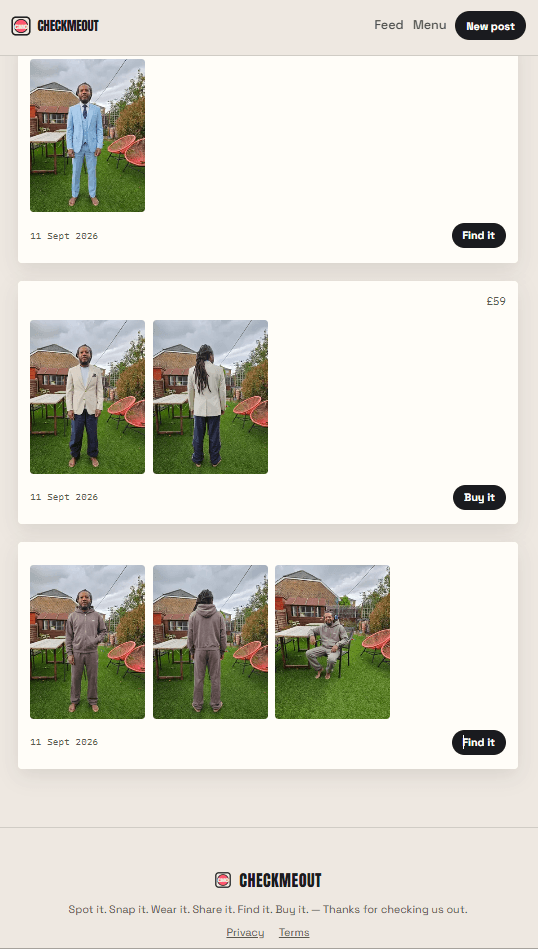
Share it
Not sure it suits you? Friends who follow you can vote Buy it or Pass, and leave comments.
You post it, and within the hour three friends have voted “Buy it.”
Find it
CheckMeOut links straight to a shop selling the item — or something close to it if we can't find the exact one.
You tap “Find it” and land on a shop page selling that jacket, price and all.
Buy it
Save your usual size once in your profile, and it's waiting right next to the buy link — no digging through old orders to remember it.
The page shows “Your size: UK 12” right under the price. You buy it.
You're only ever photographing the item itself — never a person. And your try-on photos are private by default: only you see them, unless you choose to share a post for feedback.